2 Column Image Left Module


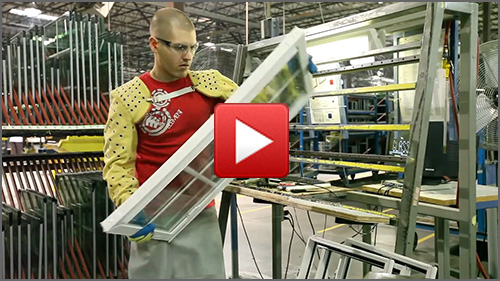
The Atrium Manufacturing Story

Tour Atrium's North Carolina manufacturing facility to learn more about the process used to build every window and patio door we make.

This module allows you to create a 2 column layout block with an image to the left with option for video linkage to YouTube, description copy, custom alt text and a lightbox effect. This content is entered into a WYSIWYG field with support for shortcodes, multiple paragraphs and text formatting as needed.

Image size is 500 x 281px. Also, this module does have the option to have a rule separator added below the module using a check box.
.section-header-divided { border: 2px solid ##00519f !important; max-width: 100% !important; }


2 Column Image Right Module


This module allows you to create a 2 column layout block with an image to the right with option for video linkage to YouTube, description copy, custom alt text and a lightbox effect. This module is just showing an image without any lother module options selected. This content is entered into a WYSIWYG field with support for shortcodes, multiple paragraphs and text formatting as needed.

Image size is 1200 x 600px. The image column module can accept different images size and the CSS will scale to fit in the defined column area.

This module does not have the separator rule feature applied.

1 Column Content Module


This is a full width WYSIWYG content module that can accept paragraphs, images (inline), shortcodes, etc. This is a good module for loading either Gravity Forms or Eloqua form code on page.

1 Column Content Module

This is a full width WYSIWYG content module that can accept paragraphs, images (inline), shortcodes, etc. This is a good module for loading either Gravity Forms or Eloqua form code on page. This example is the same as the above, with the Apply Card Styling toggle checked on.

Also, the Column Title field has been left blank to hide that and only show the Column Content.

2 Column Content Module


Column One Subhead


This is the Column One WYSIWYG content block, just add copy as needed:

  • Bullet Item 1
  • Bullet Item 2
  • Bullet Item 3

Column Two Subhead


This is the Column Two WYSIWYG content block, just add copy as needed:

  • Bullet Item 1
  • Bullet Item 2
  • Bullet Item 3

Column One Subhead


This is the Column One WYSIWYG content block, just add copy as needed:

  • Bullet Item 1
  • Bullet Item 2
  • Bullet Item 3

Column Two Subhead


This is the Column Two WYSIWYG content block, just add copy as needed:

  • Bullet Item 1
  • Bullet Item 2
  • Bullet Item 3

3 Column Content Module


Column One Subhead


This is the Column One WYSIWYG content block, just add copy as needed:

  • Bullet Item 1
  • Bullet Item 2
  • Bullet Item 3

Column Two Subhead


This is the Column Two WYSIWYG content block, just add copy as needed:

  • Bullet Item 1
  • Bullet Item 2
  • Bullet Item 3

Column Three Subhead


This is the Column Three WYSIWYG content block, just add copy as needed:

  • Bullet Item 1
  • Bullet Item 2
  • Bullet Item 3

This is the Column Three WYSIWYG content block, just add copy as needed:

  • Bullet Item 1
  • Bullet Item 2
  • Bullet Item 3

Visit Atrium.com

This is the Column Three WYSIWYG content block, just add copy as needed:

  • Bullet Item 1
  • Bullet Item 2
  • Bullet Item 3

Visit Atrium.com

This is the Column Three WYSIWYG content block, just add copy as needed:

  • Bullet Item 1
  • Bullet Item 2
  • Bullet Item 3

Visit Atrium.com